Installing Linux on a Single Hard Drive:
If you are installing Linux on a single hard drive in your system, the
process is pretty straightforward. If you have windows XP installed on
the drive, Linux will be able to "dual boot" both operating systems,
using the Grub boot manager. The following assumptions are made;
1. That you have enough disk space to house both operating systems. You can either;
- use existing free space on your Windows partition to make room for Linux.
- have free un-partitioned space on your hard drive to install Linux
- pre-format tour drive
with Linux partitions and point the installer to the partitions
that you have made.
During the installation process, Fedora will ask you what you want to do for partitioning.
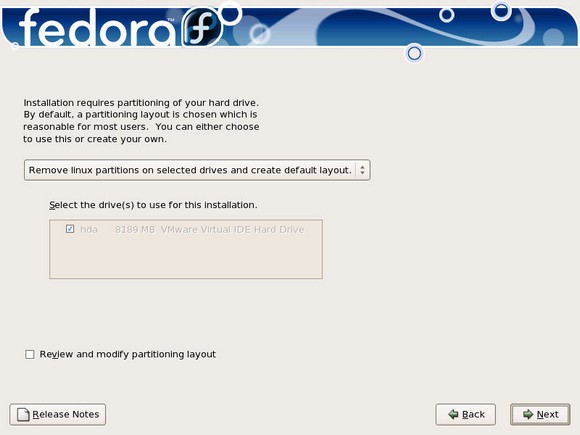
Figure 3.1
Note that the default choice is to "Remove Linux partitions on selected
drives and create default layout." This is fine if you have empty space
on the drive, or want to remove previous Linux partitions on the
system, or want Fedora to "take over" the entire hard drive.
If
you want Fedora to use empty (non-formated) space on the hard drive,
choose the "Use free space on the selected drives and create default
layout."
Use the "create custom layout" if you want to tell Fedora to use pre-existing Linux partitions that you made on the hard drive.
Also notice that in figure 1, there is only one drive shown, hda, which is the only drive on the system, the primary master.
2. That your system has a supported Processor and enough RAM to run Linux (see page 1).
3. That you have determined that your hardware is compatible with the distro that you are installing.
4. Have a backup plan. See the tip below. also, if you have a system
that came a pre-installed with Windows, make sure that you have either
a full installation CD disk or the recovery disks for your specific
system handy, just in case.
| TIP: Before making any changes to a hard drive that has a
pre-existing installation of Windows, defrag the Windows partition and
back up any important data files to CDROM or another hard drive. |
How not to Install Linux on a Single Hard Drive:
Just throw caution to the wind and
not read any installation documents (not have a plan). Then you can
post on any Linux forum and ask what went wrong. However, I am not
responsible for the responses that you receive!
I can't tell you how many folks do this. The expectation is that the
installer will take care of any hardware that you have and magically
know what you want to do. Even windows does not do this. If you tried
to install Windows on a new sata drive in your system, you understand
what I mean.
Tell the Linux installer to "take-over" your hard drive, if this is not what you want it to do.
If you have another operating system on your hard drive, and want to
keep it, then do not allow Linux to "take-over" the whole hard drive.
Doing so will erase any traces of your other OS. Please read the
screens carefully as you do the installation, before you make a choice.
Accept all the default setting and
answers to the installation questions and not follow the directions
during the installation process.
I make the point again. During the installation process, Linux will ask
you several questions about your system, what you want to do and help
set up your hardware. If you miss these questions, or do not follow the
directions carefully, you can usually recover or set up the missed
hardware later. A good example are folks who have an Internet
Connection via DSL Linux assumes that you have a broadband connection
in may cases. If you do not, follow the directions as you proceed
carefully, answering questions correctly and making sure that you have
all the information on your DSL setup available (ie; username and
password).
Assume that everything will work out-of-the-box.
I don't care what OS you install. The thousands of hardware
devices out there make this assumption false. Yes, most hardware
manufacturers make drives for their particular hardware, which stresses
the point. In Windows, these drivers are usually needed to make the
hardware work correctly. This is the same case with Linux. As Linux
becomes more popular and users demand drivers for specific hardware in
Linux, manufacturers are beginning to respond.
My favorite example here again, is networking. A recent post that I
responded to had this exact question. His connection worked fine in
Windows, but not in Linux. As the thread progressed, he noted that he
had to set up the DSL connection in Windows with a user disk from his
ISP. He remembered needing to set his user ID and password up for the
modem when using the ISP provided disk. Same rules apply here. you can
set up DSL properly in Linux, but it does not do so without the user
setting up the connection with the proper information for the account.
Another example is a user who buys a wireless network card and can't
get it to work in Linux. The manufacturer's website states that it
works in Windows. The retail packaging says it works in Windows, but
there is no mention of Linux. While often it is possible to get
hardware designed for Windows to work in Linux, make sure that you have
a plan. Before you buy a new piece of hardware, consider the following;
- does the manufacturer have drivers for Linux, or support Linux?
- If you read the hardware
support database for your distro, does it mention that the hardware is supported?
- Did you ask on a support forum,
or do a search on the Internet to see if the hardware is supported?